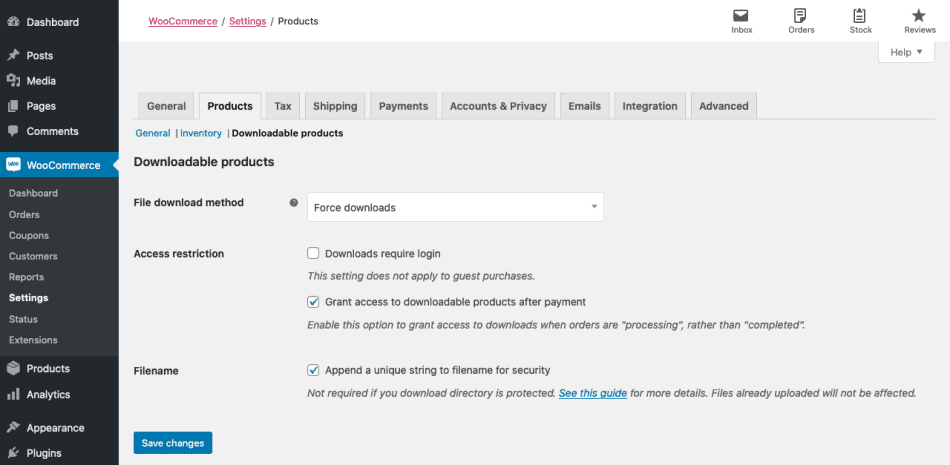
如果您希望在處理訂單而不是完成訂單時授予對文件的訪問權限,請勾選“Grant access to downloadable products after payment/付款後授予對可下載產品的訪問權限”複選框。
如果要確保增強文件的安全性,請選擇“Append a unique string to filename for security/將唯一字符串附加到文件名以確保安全性”。建議將其勾選,並且默認就是勾選的。但如果某人已正確配置其上傳目錄,則不需要此操作。當您啟用它時,不會影響任何文件名或鏈接,只有在選中此設置時上傳的文件才會添加唯一的字符串。此設置完全向後兼容,可以隨意關閉或打開,而不會影響任何已生成的文件鏈接。
# Protect WooCommerce upload folder from being accessed directly. # You may want to change this config if you are using "Redirect Only" method for downloadable products. # Place this config towards the end of "server" block in nGinx configuration. location ~* /wp-content/uploads/woocommerce_uploads/ { if ( $upstream_http_x_accel_redirect = "" ) { return 403; } internal; }
如果您使用的是僅重定向下載方法,那就使用下面的配置為:
# Protect WooCommerce upload folder from being accessed directly. # You may want to change this config if you are using "X-Accel-Redirect/X-Sendfile" or "Force Downloads" method for downloadable products. # Place this config towards the end of "server" block in nGinx configuration. location ~* /wp-content/uploads/woocommerce_uploads/ { autoindex off; }







al2359(4年前 (2023-02-06))