R3#debug ip bgp
BGP debugging is on for address family: IPv4 Unicast
R3#clear ip bgp *
R3#
*Mar 1 02:11:24.015: BGPNSF state: 192.168.23.2 went from nsf_not_active to nsf_not_active
*Mar 1 02:11:24.019: BGP: 192.168.23.2 went from Established to Idle
*Mar 1 02:11:24.019: %BGP-5-ADJCHANGE: neighbor 192.168.23.2 Down User reset
*Mar 1 02:11:24.023: BGP: 192.168.23.2 closing
*Mar 1 02:11:24.027: BGP: 192.168.23.2 went from Idle to Active
*Mar 1 02:11:24.039: BGP: 192.168.23.2 open active, local address 192.168.23.3
*Mar 1 02:11:24.111: BGP: 192.168.23.2 went from Active to OpenSent
*Mar 1 02:11:24.111: BGP: 192.168.23.2 sending OPEN, version 4, my as: 65501, holdtime 180 seconds
*Mar 1 02:11:24.111: BGP: 192.168.23.2 send message type 1, length (incl. header) 45
*Mar 1 02:11:24.167: BGP: 192.168.23.2 rcv message type 1, length (excl. header) 26
*Mar 1 02:11:24.167: BGP: 192.168.23.2 rcv OPEN, version 4, holdtime 180 seconds
*Mar 1 02:11:24.167: BGP: 192.168.23.2 rcv OPEN w/ OPTION parameter len: 16
*Mar 1 02:11:24.167: BGP: 192.168.23.2 rcvd OPEN w/ optional parameter type 2 (Capability) len 6
*Mar 1 02:11:24.167: BGP: 192.168.23.2 OPEN has CAPABILITY code: 1, length 4
*Mar 1 02:11:24.167: BGP: 192.168.23.2 OPEN has MP_EXT CAP for afi/safi: 1/1
*Mar 1 02:11:24.167: BGP: 192.168.23.2 rcvd OPEN w/ optional parameter type 2 (Capability) len 2
*Mar 1 02:11:24.167: BGP: 192.168.23.2 OPEN has CAPABILITY code: 128, length 0
*Mar 1 02:11:24.167: BGP: 192.168.23.2 OPEN has ROUTE-REFRESH capability(old) for all address-families
*Mar 1 02:11:24.167: BGP: 192.168.23.2 rcvd OPEN w/ optional parameter type 2 (Capability) len 2
*Mar 1 02:11:24.167: BGP: 192.168.23.2 OPEN has CAPABILITY code: 2, length 0
*Mar 1 02:11:24.167: BGP: 192.168.23.2 OPEN has ROUTE-REFRESH capability(new) for all address-families
BGP: 192.168.23.2 rcvd OPEN w/ remote AS 65501
*Mar 1 02:11:24.167: BGP: 192.168.23.2 went from OpenSent to OpenConfirm
*Mar 1 02:11:24.167: BGP: 192.168.23.2 went from OpenConfirm to Established
*Mar 1 02:11:24.167: %BGP-5-ADJCHANGE: neighbor 192.168.23.2 Up
用 Loopback 来建立 iBGP Peers
在一个 AS 当中,除了 BGP 之外,一般会使用 IGP (例如:OSPF, EIGRP) 来作路由交换,在这个情况下,我们会使用 Loopback interface 作为 iBGP 的 neighbor address。因为 Loopback interface 永远是 UP 的,而且 Neighbor 之间可以自己通过 IGP 来寻找到达 Loopback 的路径,这比起使用 Interface IP 来作 neighbor address 来得灵活一点,也减少了因为 Interface down 而令 BGP Table 不稳定。
hostname R4
!
interface Ethernet0/0
ip address 192.168.24.4 255.255.255.0
!
interface Ethernet0/1
ip address 192.168.34.4 255.255.255.0
!
router ospf 1
network 0.0.0.0 255.255.255.255 area 0
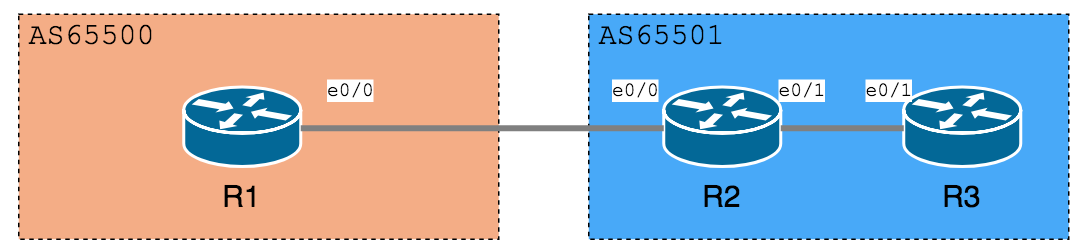
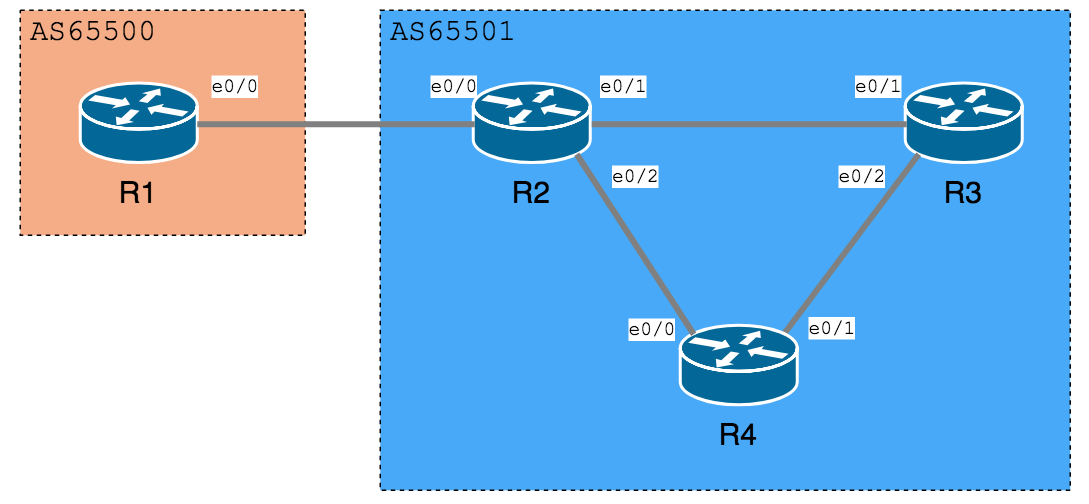
正常情况下,R3 与 R2 能够建立 iBGP Peers:
R3
1
2
3
4
5
6
R3#show ip bgp summary
BGP router identifier 192.168.23.3, local AS number 65501
BGP table version is 1, main routing table version 1
Neighbor V AS MsgRcvd MsgSent TblVer InQ OutQ Up/Down State/PfxRcd
192.168.23.2 4 65501 11 15 1 0 0 00:05:22 0
R3#show ip bgp summary
BGP router identifier 192.168.23.3, local AS number 65501
BGP table version is 1, main routing table version 1
Neighbor V AS MsgRcvd MsgSent TblVer InQ OutQ Up/Down State/PfxRcd
192.168.23.2 4 65501 12 20 0 0 0 00:00:06 Active
这样子,就算把 R3 的 e0/1 shutdown,iBGP 都不会有中断的情况,因为 R2 和 R3 会跟据 OSPF 提供的路由使用 R2-R4-R3 的路径来连接对方的 Loopback Interface IP。而且在 show ip bgp summary 中也看到 Neighbor IP 变成对方 Loopback 的 IP 了。
R3
1
2
3
4
5
6
R3#sh ip bgp summary
BGP router identifier 192.168.23.3, local AS number 65501
BGP table version is 1, main routing table version 1
Neighbor V AS MsgRcvd MsgSent TblVer InQ OutQ Up/Down State/PfxRcd
2.2.2.2 4 65501 13 13 1 0 0 00:09:12 0
请留意,Loopback 这个技巧通常只用在 iBGP 的 connection,甚少用于 eBGP,因为我们不会用 IGP 把两个不同的 AS 连起来。
hostname Firewall
!
interface Ethernet0/0
ip address 10.1.1.2 255.255.255.0
!
interface Ethernet0/1
ip address 10.2.2.2 255.255.255.0
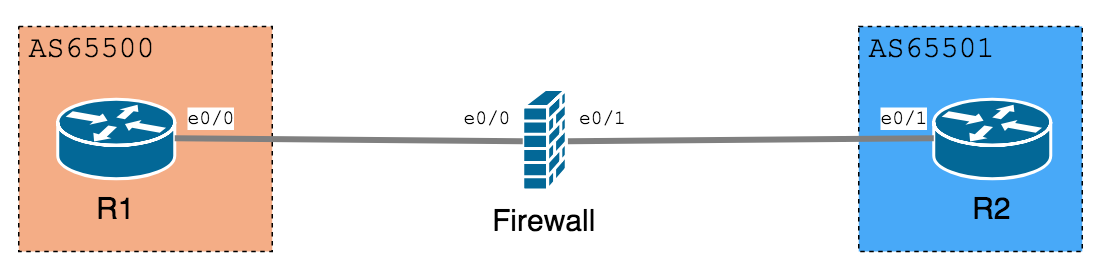
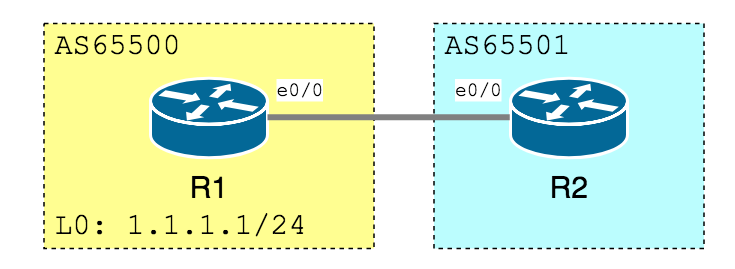
在 R1 测试一下,明明可以 PING 到 10.2.2.1,就是没法建立 BGP Peers:
R1
1
2
3
4
5
6
7
8
9
10
11
12
R1#ping 10.2.2.1
Type escape sequence to abort.
Sending 5, 100-byte ICMP Echos to 10.2.2.1, timeout is 2 seconds:
!!!!!
Success rate is 100 percent (5/5), round-trip min/avg/max = 40/50/72 ms
R1#show ip bgp summary
BGP router identifier 10.1.1.1, local AS number 65500
BGP table version is 1, main routing table version 1
Neighbor V AS MsgRcvd MsgSent TblVer InQ OutQ Up/Down State/PfxRcd
10.2.2.1 4 65501 31 32 0 0 0 00:02:05 Idle
先在 R1 用 show ip route 确认一下 1.1.1.0/24 出现在 Routeing table 之中。
1
2
3
4
5
6
7
R1#show ip route
<Output Omitted>
C 192.168.12.0/24 is directly connected, Ethernet0/0
1.0.0.0/24 is subnetted, 1 subnets
C 1.1.1.0 is directly connected, Loopback0
然后使用 show ip bgp,可以看到 1.1.1.0/24 已经加入 BGP Table 了。
1
2
3
4
5
6
R1#show ip bgp
<Output Omitted>
Network Next Hop Metric LocPrf Weight Path
*> 1.1.1.0/24 0.0.0.0 0 32768 i
再来看看 R2 的 show ip bgp,有收到 1.1.1.0/24,而且 show ip route 也看到这网段已成功加入在 Route Table 之中!
1
2
3
4
5
6
R2#show ip bgp
<Output Omitted>
Network Next Hop Metric LocPrf Weight Path
*> 1.1.1.0/24 192.168.12.1 0 0 65100 i
1
2
3
4
5
6
7
8
R2#show ip route
<Output Omitted>
C 192.168.12.0/24 is directly connected, Ethernet0/0
1.0.0.0/24 is subnetted, 1 subnets
B 1.1.1.0 [20/0] via 192.168.12.1, 00:08:35
C 192.168.23.0/24 is directly connected, Ethernet0/1
R3 的情况又怎样呢?
1
2
3
4
5
6
7
8
9
10
11
12
13
R3#show ip bgp
<Output Omitted>
Network Next Hop Metric LocPrf Weight Path
*> 1.1.1.0/24 192.168.23.2 0 65200 65100 i
R3#show ip route
<Output Omitted>
1.0.0.0/24 is subnetted, 1 subnets
B 1.1.1.0 [20/0] via 192.168.23.2, 00:16:04
C 192.168.23.0/24 is directly connected, Ethernet0/1
就是一个 Network 指令,便完成了这个简单的 BGP 网络路由交换了。在此我们先解释一下在 show ip bgp 中看到的栏位都代表什么意思?
Network
网段的 Network ID 与及 Prefix Length。
Next Hop
要到达这个网段的 Next Hop IP address。如果显示为 0.0.0.0,即是说此网段是由本地 Router 发布的。另外有一个重要的地方要注意,就是此栏位所显示的 Next Hop IP 必需有路由可到达,此网段才会放入 Routing Table 之中,暂时请稍稍记一下,稍后的例子会加以说明。
Path
到达这个网段所经过的 AS Number,如果该网段是在本机的 AS Number 之中,此值便会变成空白,请留意是空白,并非 i ,i 是下一个栏位 Origin。
Origin
Origin 并没有在栏位名显示出来,Origin 的值就显示在 Path 属性后面,只有三个值:i , e 或是 ?
i
此 Route 的来源是 IGP 或者是用 Network 指令
e
此 Route 的来源是 EGP,不过 EGP 已经是历史的产物,可以不用理会了。
?
此 Route 是通过 redistribute 得来的
Origin 也是选择最佳路径的一个方法,在稍后会详细说明。
Next-hop-self 指令
现在我们试试另一个例子:
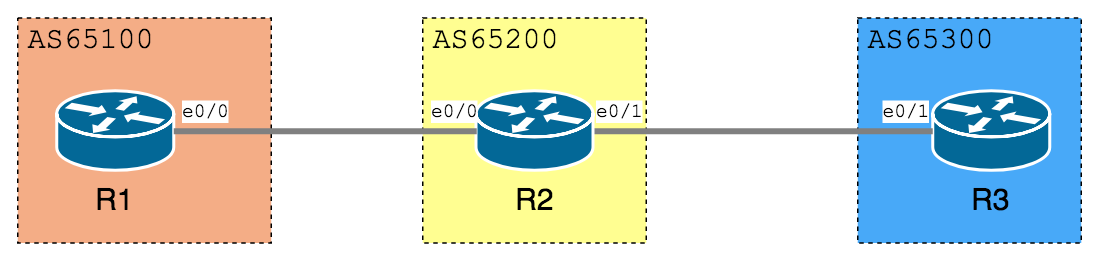
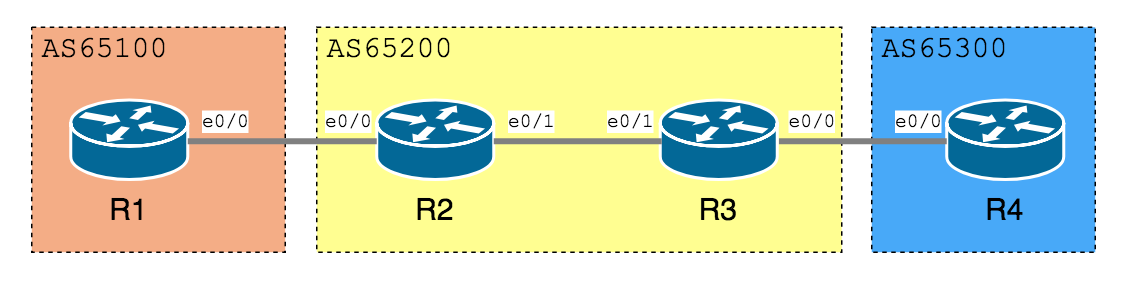
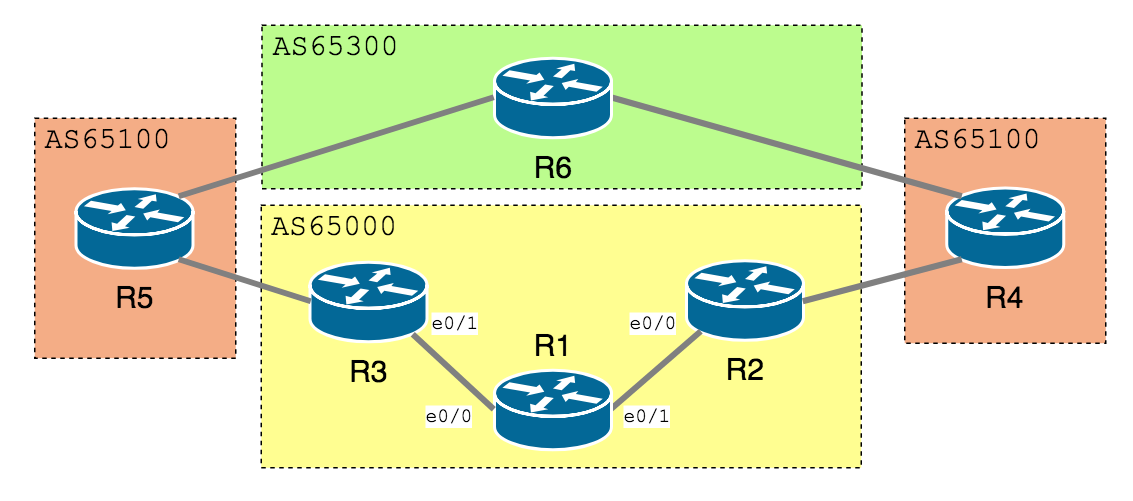
R1 与 R2 是 eBGP,R2 与 R3 是 iBGP,R3 与 R4 是 eBGP。假设全部 IP 及 Peers 已经设置好,我们在 R1 设置 Loopback Interface 然后把它发布出去。看看 R2 的 BGP database,有 > 标记表示 BGP 选好了用 Next Hop IP 192.168.12.1 来到达 1.1.1.0/24,Route Table 也似乎没问题。
R2
1
2
3
4
5
6
7
8
9
10
11
12
13
14
R2#show ip bgp
<Output Omitted>
Network Next Hop Metric LocPrf Weight Path
*> 1.1.1.0/24 192.168.12.1 0 0 65100 i
R2#show ip route
<Output Omitted>
C 192.168.12.0/24 is directly connected, Ethernet0/0
1.0.0.0/24 is subnetted, 1 subnets
B 1.1.1.0 [20/0] via 192.168.12.1, 00:07:37
C 192.168.23.0/24 is directly connected, Ethernet0/1
R3#show ip bgp
<Output Omitted>
Network Next Hop Metric LocPrf Weight Path
* i1.1.1.0/24 192.168.12.1 0 100 0 65100 i
R3
1
2
3
4
5
6
7
R3#show ip route
<Output Omitted>
C 192.168.12.0/24 is directly connected, Ethernet0/0
1.0.0.0/24 is subnetted, 1 subnets
C 192.168.23.0/24 is directly connected, Ethernet0/1
大家还记得吗?在上一部份介绍 Next Hop 这个栏位时,我们说过 Next Hop IP 必需要「可以到达」的才能把该条 Route 加入 Route Table,由于对 R3 来说,192.168.12.1 并没有路径可以到达 (即 Route Table 里找不到 192.168.12.1 的 Route) ,所以 R3 不会把这条 Route 加入 Route Table。
至于为什么 Next Hop IP 会是 192.168.12.1 而不是 R2 的 192.168.23.2 呢?这是因为当 BGP 把一条 Route 用 iBGP 发布给 Neighbor 时,Default 是不会更改其 Next Hop 的 IP ,这点我们需要紧记!
R3(config)#ip route 192.168.12.1 255.255.255.255 ethernet 0/1
R3(config)#do sh ip route
<Output Omitted>
192.168.12.0/32 is subnetted, 1 subnets
S 192.168.12.1 is directly connected, Ethernet0/1
1.0.0.0/24 is subnetted, 1 subnets
B 1.1.1.0 [200/0] via 192.168.12.1, 00:00:04
C 192.168.23.0/24 is directly connected, Ethernet0/1
C 192.168.34.0/24 is directly connected, Ethernet0/0
另一个方法是使用 Next-hop-self 指令,迫使 R2 在发布 Route 给 R3 时使用自己的 IP 作为 Next Hop IP。只要在 BGP config 中加入一句 neighbor [IP] next-hop-self 便可以了。
现在我们再看看 R3 的 BGP Table,Next Hop 变成 192.168.23.2 了,有 > 标记,证明 BGP 接受了这条为 Best Path,Route Table 亦成功加入这条 Route。
R3
1
2
3
4
5
6
R3#show ip bgp
<Output Omitted>
Network Next Hop Metric LocPrf Weight Path
*>i1.1.1.0/24 192.168.23.2 0 100 0 65100 i
R3
1
2
3
4
5
6
7
8
R3#show ip route
<Output Omitted>
1.0.0.0/24 is subnetted, 1 subnets
B 1.1.1.0 [200/0] via 192.168.23.2, 00:02:47
C 192.168.23.0/24 is directly connected, Ethernet0/1
C 192.168.34.0/24 is directly connected, Ethernet0/0
R2#show ip bgp
<Output Omitted>
Network Next Hop Metric LocPrf Weight Path
*> 1.1.1.0/24 192.168.12.1 0 0 65100 i
R5 收到但没有 > 标记,所以没有发布出去:
R5
1
2
3
4
R5#show ip bgp
<Output Omitted>
Network Next Hop Metric LocPrf Weight Path
* i1.1.1.0/24 2.2.2.2 0 100 0 65100 i
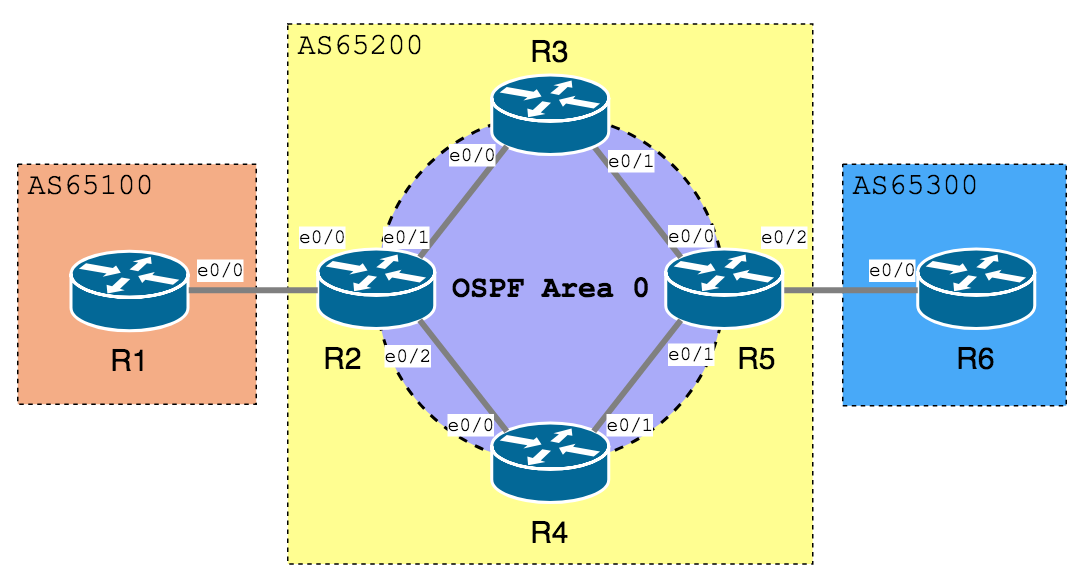
为什么没有发布呢?因为 IGP 「看不懂」 1.1.1.0/24
R5
1
2
3
4
5
6
7
8
9
10
11
12
13
14
R5# show ip route
<--Output Omitted-->
2.0.0.0/32 is subnetted, 1 subnets
O 2.2.2.2 [110/21] via 192.168.45.4, 00:37:38, Ethernet0/1
[110/21] via 192.168.35.3, 00:37:38, Ethernet0/0
C 192.168.45.0/24 is directly connected, Ethernet0/1
O 192.168.24.0/24 [110/20] via 192.168.45.4, 00:37:38, Ethernet0/1
5.0.0.0/24 is subnetted, 1 subnets
C 5.5.5.0 is directly connected, Loopback0
C 192.168.56.0/24 is directly connected, Ethernet0/2
O 192.168.23.0/24 [110/20] via 192.168.35.3, 00:37:38, Ethernet0/0
C 192.168.35.0/24 is directly connected, Ethernet0/0
R2#show ip bgp
<Output Omitted>
Network Next Hop Metric LocPrf Weight Path
* i6.6.6.0/24 192.168.13.3 0 100 0 65100 65300 i
*> 192.168.24.4 0 65200 65300 i
Local Preference (选较大的)
如果因为 Weight 相同而没法选出 Best Path,BGP 会用 Local Preference 来判断,一条 Route 的 Local Preference 较大的话,它就是整个 AS 对于该个 Destination 的出口。
接着,我们再使用相同的例子,但先在 R1 把两条 Route 的 Weight 调至一样。
R1
1
2
3
4
5
6
7
R1#show ip bgp
<Output Omitted>
Network Next Hop Metric LocPrf Weight Path
*>i6.6.6.0/24 192.168.12.2 0 100 1000 65200 65300 i
* i 192.168.13.3 0 100 1000 65100 65300 i
R3(config)#router bgp 65000
R3(config-router)#neighbor 192.168.35.5 route-map TuningLocPrf in
R3(config-router)#exit
R3(config)#ip access-list extended RouteMatch
R3(config-ext-nacl)#permit ip 6.6.6.0 0.0.0.255 any
R3(config-ext-nacl)#route-map TuningLocPrf permit 10
R3(config-route-map)#match ip address RouteMatch
R3(config-route-map)#set local-preference 500
R3(config-route-map)#end
R3#clear ip bgp *
由于 Local Preference 是整个 AS 的事,所以这个 Attribute 会传输到 iBGP Peers。
看看 R1 的 BGP Table,可以看到 Local Preference 已经变成 500 了,顺理成章地,R1 把这条选为 Best Path。
R1
1
2
3
4
5
6
7
R1#show ip bgp
<Output Omitted>
Network Next Hop Metric LocPrf Weight Path
*>i6.6.6.0/24 192.168.13.3 0 500 1000 65100 65300 i
* i 192.168.12.2 0 100 1000 65200 65300 i
AS Path 是到达目的地网段所要经过的 AS,BGP 认为 AS Path 越短越好,如果以上两点都无法分出胜负,BGP 就会选 AS Path 较短的那条 Route 为 Best Path。
以同一例子来测试,不过我们先把 R1 的两条 Route Local Preference 值调整到一样。
R1
1
2
3
4
5
6
7
R1#sh ip bgp
<Output Omitted>
Network Next Hop Metric LocPrf Weight Path
*>i6.6.6.0/24 192.168.12.2 0 500 1000 65200 65300 i
* i 192.168.13.3 0 500 1000 65100 65300 i
现时使用了第一条 Route 为 Best Path,如果把第一条的 AS Path 增长,那么第二条 Route 应该可以成为 Best Path。
如果我们不想大费周章去改变网络的 Topology,那怎样可以简单地改动 AS Path 来测试呢?
我们可以使用 Route Map 里面的 Prepend。Prepend 可以在 AS Path 很犯规地加入一些 AS Number,让它变得较长,不过此方法只可用于 eBGP Peers 传来的 Route,iBGP Peers 传出的是不能修改 AS Path 的。因此,为了延长第一条 Route 的 AS Path,我们可以走到 R4 改设置,实例如下:
R1#show ip bgp
<Output Omitted>
Network Next Hop Metric LocPrf Weight Path
*>i6.6.6.0/24 192.168.12.2 0 500 1000 65200 65300 i
* i 192.168.13.3 0 500 1000 65100 65300 i
回到 R1 看 BGP Table,Origin 变成 ?,但由于 R4 的设置改变了 AS Path,我们必需 Prepend AS Path,来证明在 AS Path 长度相同的情况下,BGP 比较喜欢 i 多于 ? 。Prepend AS Path 的办法在上一部份已说明过了,在此不重复描述。
R1
1
2
3
4
5
6
7
R1#show ip bgp
<Output Omitted>
Network Next Hop Metric LocPrf Weight Path
*>i6.6.6.0/24 192.168.12.2 0 500 1000 65200 ?
* i 192.168.13.3 0 500 1000 65100 65300 i
Prepend 好 AS Path 之后,两条 Route AS Path 长度一样,BGP Table 果然选了 Origin i 的第二条作为 Best Path。
R1
1
2
3
4
5
6
R1#show ip bgp
<Output Omitted>
Network Next Hop Metric LocPrf Weight Path
* i6.6.6.0/24 192.168.12.2 0 500 1000 65200 65200 ? *>i 192.168.13.3 0 500 1000 65100 65300 i
MED (选较小的)
故事尚未完结,如果去到 Origin Type 也相同,下一个要比较的就是 MED (Metric)。MED 就像 IGP 里的 Metric,是一个可以传到另一个 AS 的 Attribute,Metric 较少的 Route 会被选为 Best Path。
不过要注意的是,MED 必需要在 AS Path 中第一个 AS Number 相同的时候才会作出比较,除非使用了 bgp always compare MED,则不设此限。
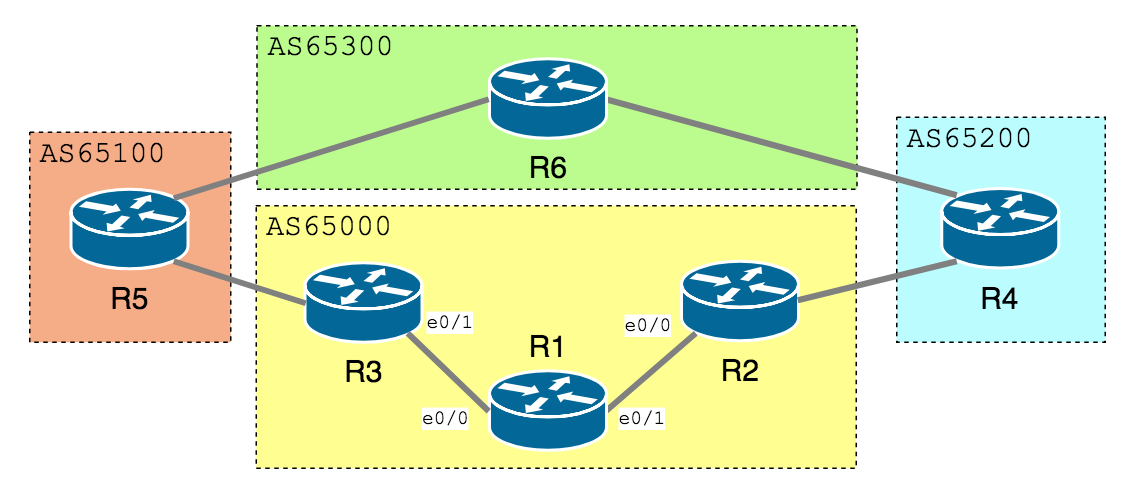
为了做这个测试,我们在下图的 Topology 中把 AS 65200 改成 65100。
另外还故意把 Weight, LocPrf, AS Path, Origin 都设置成相同的值,现时使用第一条 Route 作为 Best Path,如果把第一条 Route 的 Metric 增大,理论上它就会失去 Best Path 了。
R1
1
2
3
4
5
6
7
R1#show ip bgp
<Output Omitted>
Network Next Hop Metric LocPrf Weight Path
*>i6.6.6.0/24 192.168.12.2 0 500 1000 65100 65300 i
* i 192.168.13.3 0 500 1000 65100 65300 i
值得留意的是,这个 AS 当中的 R2 和 R3 的 Metric 同样改变了,因为 Metric 是传到整个 AS 当中的。
R1
1
2
3
4
5
6
7
R1#sh ip bgp
<Output Omitted>
Network Next Hop Metric LocPrf Weight Path
* i6.6.6.0/24 192.168.12.2 100 500 1000 65100 65300 i
*>i 192.168.13.3 0 500 1000 65100 65300 i
R2
1
2
3
4
5
6
7
R2#show ip bgp
<Output Omitted>
Network Next Hop Metric LocPrf Weight Path
*> 6.6.6.0/24 192.168.24.4 100 500 0 65100 65300 i
* i 192.168.13.3 0 500 0 65100 65300 i
R3
1
2
3
4
5
6
7
R3#show ip bgp
<Output Omitted>
Network Next Hop Metric LocPrf Weight Path
*> 6.6.6.0/24 192.168.35.5 0 65100 65300 i
* i 192.168.12.2 100 500 0 65100 65300 i
预设情况下,如 Route 没有提供 MED 值则设为 0,如使用 bgp bestpath med missing-as-worst 则预设值改为最大值,即 4, 294, 967, 294。
R5#show ip protocols
*** IP Routing is NSF aware ***
Routing Protocol is "bgp 65125"
Outgoing update filter list for all interfaces is not set
Incoming update filter list for all interfaces is not set
IGP synchronization is disabled
Automatic route summarization is disabled
Neighbor(s):
Address FiltIn FiltOut DistIn DistOut Weight RouteMap
192.168.15.1
192.168.25.2
192.168.35.3
Maximum path: 1
Routing Information Sources:
Gateway Distance Last Update
192.168.35.3 20 00:02:10
Distance: external 20 internal 200 local 200
所以根据概率程序选了 Next-hop 192.168.25.2 为 Best Path。
R5
1
2
3
4
5
6
7
8
9
10
11
12
R5#show ip bgp
BGP table version is 5, local router ID is 192.168.35.5
Status codes: s suppressed, d damped, h history, * valid, > best, i - internal,
r RIB-failure, S Stale, m multipath, b backup-path, f RT-Filter,
x best-external, a additional-path, c RIB-compressed,
Origin codes: i - IGP, e - EGP, ? - incomplete
RPKI validation codes: V valid, I invalid, N Not found
Network Next Hop Metric LocPrf Weight Path
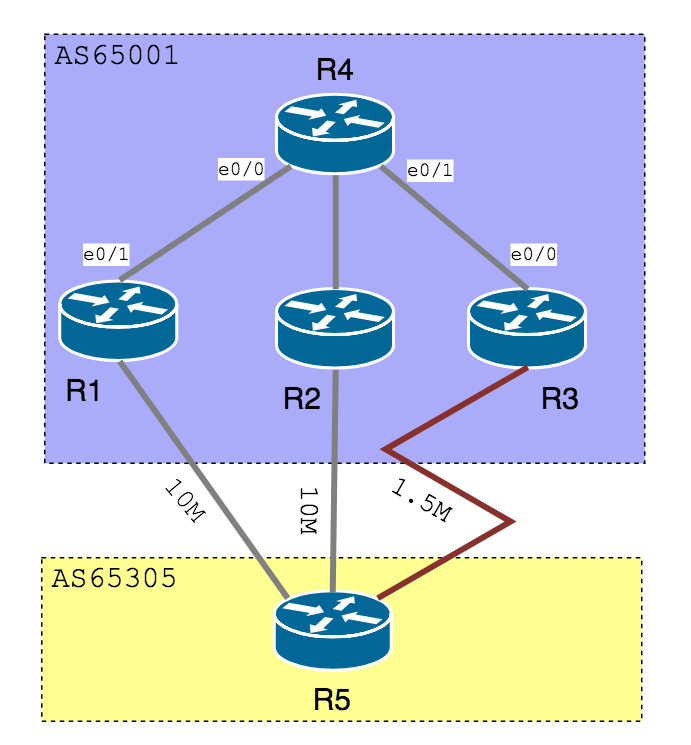
* 172.16.4.0/24 192.168.35.3 0 65001 i
* 192.168.15.1 0 65001 i
*> 192.168.25.2 0 65001 i
R5#show ip bgp
BGP table version is 6, local router ID is 192.168.35.5
Status codes: s suppressed, d damped, h history, * valid, > best, i - internal,
r RIB-failure, S Stale, m multipath, b backup-path, f RT-Filter,
x best-external, a additional-path, c RIB-compressed,
Origin codes: i - IGP, e - EGP, ? - incomplete
RPKI validation codes: V valid, I invalid, N Not found
Network Next Hop Metric LocPrf Weight Path
*m 172.16.4.0/24 192.168.35.3 0 65001 i
*m 192.168.15.1 0 65001 i
*> 192.168.25.2 0 65001 i
R5#show ip route 172.16.4.0
Routing entry for 172.16.4.0/24
Known via "bgp 65005", distance 20, metric 0
Tag 65001, type external
Last update from 192.168.25.2 00:05:20 ago
Routing Descriptor Blocks:
* 192.168.35.3, from 192.168.35.3, 00:05:20 ago
Route metric is 0, traffic share count is 1
AS Hops 1
Route tag 65001
MPLS label: none
192.168.25.2, from 192.168.25.2, 00:05:20 ago
Route metric is 0, traffic share count is 1
AS Hops 1
Route tag 65001
MPLS label: none
192.168.15.1, from 192.168.15.1, 00:05:20 ago
Route metric is 0, traffic share count is 1
AS Hops 1
Route tag 65001
MPLS label: none
R5#show ip route 172.16.4.0
Routing entry for 172.16.4.0/24
Known via "bgp 65005", distance 20, metric 0
Tag 65001, type external
Last update from 192.168.25.2 00:00:19 ago
Routing Descriptor Blocks:
* 192.168.35.3, from 192.168.35.3, 00:00:19 ago
Route metric is 0, traffic share count is 37
AS Hops 1
Route tag 65001
MPLS label: none
192.168.25.2, from 192.168.25.2, 00:00:19 ago
Route metric is 0, traffic share count is 240
AS Hops 1
Route tag 65001
MPLS label: none
192.168.15.1, from 192.168.15.1, 00:00:19 ago
Route metric is 0, traffic share count is 240
AS Hops 1
Route tag 65001
MPLS label: none
以上只是部份比较常用的 Best Path 机制,如果希望了解到更多,你可以到 这里 查看更详细的教学。
R2#show ip bgp 1.1.1.0
BGP routing table entry for 1.1.1.0/24, version 2
Paths: (1 available, best #1, table Default-IP-Routing-Table)
Not advertised to any peer
65000
192.168.12.1 from 192.168.12.1 (192.168.12.1)
Origin IGP, metric 0, localpref 100, valid, external, best
hostname R1
!
router bgp 65000
network 1.1.1.0 mask 255.255.255.0
neighbor 192.168.12.2 remote-as 65001
neighbor 192.168.12.2 send-community
neighbor 192.168.12.2 route-map SetComm out
!
access-list 1 permit 1.1.1.0 0.0.0.255
!
route-map SetComm permit 10
match ip address 1
set community 1000
现在看看 R2 的 Prefix 1.1.1.0,发现多了一行 Community 显示值为 1000。
R2
1
2
3
4
5
6
7
8
9
R2#show ip bgp 1.1.1.0
BGP routing table entry for 1.1.1.0/24, version 2
Paths: (1 available, best #1, table Default-IP-Routing-Table)
Flag: 0x820
Not advertised to any peer
65000
192.168.12.1 from 192.168.12.1 (192.168.12.1)
Origin IGP, metric 0, localpref 100, valid, external, best
Community: 1000
于是,我们就可以在 R2 使用 Community List 和 Route Map 配合一起做些事情。
例如我们想把 Community 是 1000 的 prefix 的 Local Preference 改成 500。
hostname R2
!
router bgp 65001
neighbor 192.168.12.1 remote-as 65000
neighbor 192.168.12.1 route-map SetLocal in
no auto-summary
!
ip community-list 1 permit 1000
!
route-map SetLocal permit 10
match community 1
set local-preference 500
R2#show ip bgp
BGP table version is 2, local router ID is 192.168.12.2
Status codes: s suppressed, d damped, h history, * valid, > best, i - internal,
r RIB-failure, S Stale
Origin codes: i - IGP, e - EGP, ? - incomplete
Network Next Hop Metric LocPrf Weight Path
*> 1.1.1.0/24 192.168.12.1 0 500 0 65000 i
另外,利用 Community 也能做一些 Route Filtering 的动作。
Community 的值除了可以自己设置外,其实系统有 4 个预设值可以使用,分别是:no-advertise,local-AS,no-export 和 internet,4 个预设值的作用如下:
Keywords
功能
no-advertise
告诉收到这条 Prefix 的 Router 不要将这条 Prefix 发布出去
local-AS
告诉收到这条 Prefix 的 Router 这条 Prefix 只能发布给 Confederation 中的同一个 AS
R2#show ip bgp 1.1.1.0
BGP routing table entry for 1.1.1.0/24, version 2
Paths: (1 available, best #1, table Default-IP-Routing-Table, not advertised to any peer)
Not advertised to any peer
Local, (Received from a RR-client)
192.168.12.1 from 192.168.12.1 (4.4.4.4)
Origin IGP, metric 0, localpref 100, valid, confed-internal, best
Community: no-advertise
R2#show ip bgp 2.2.2.0
BGP routing table entry for 2.2.2.0/24, version 3
Paths: (1 available, best #1, table Default-IP-Routing-Table, not advertised outside local AS)
Advertised to update-groups:
1
Local, (Received from a RR-client)
192.168.12.1 from 192.168.12.1 (4.4.4.4)
Origin IGP, metric 0, localpref 100, valid, confed-internal, best
Community: local-AS
R2#show ip bgp 3.3.3.0
BGP routing table entry for 3.3.3.0/24, version 4
Paths: (1 available, best #1, table Default-IP-Routing-Table, not advertised to EBGP peer)
Advertised to update-groups:
1
Local, (Received from a RR-client)
192.168.12.1 from 192.168.12.1 (4.4.4.4)
Origin IGP, metric 0, localpref 100, valid, confed-internal, best
Community: no-export
R2#show ip bgp 4.4.4.0
BGP routing table entry for 4.4.4.0/24, version 5
Paths: (1 available, best #1, table Default-IP-Routing-Table)
Advertised to update-groups:
1
Local, (Received from a RR-client)
192.168.12.1 from 192.168.12.1 (4.4.4.4)
Origin IGP, metric 0, localpref 100, valid, confed-internal, best
Community: internet
R3#show ip bgp
BGP table version is 4, local router ID is 192.168.34.3
Status codes: s suppressed, d damped, h history, * valid, > best, i - internal,
r RIB-failure, S Stale
Origin codes: i - IGP, e - EGP, ? - incomplete
Network Next Hop Metric LocPrf Weight Path
*>i2.2.2.0/24 192.168.12.1 0 100 0 i
*>i3.3.3.0/24 192.168.12.1 0 100 0 i
*>i4.4.4.0/24 192.168.12.1 0 100 0 i
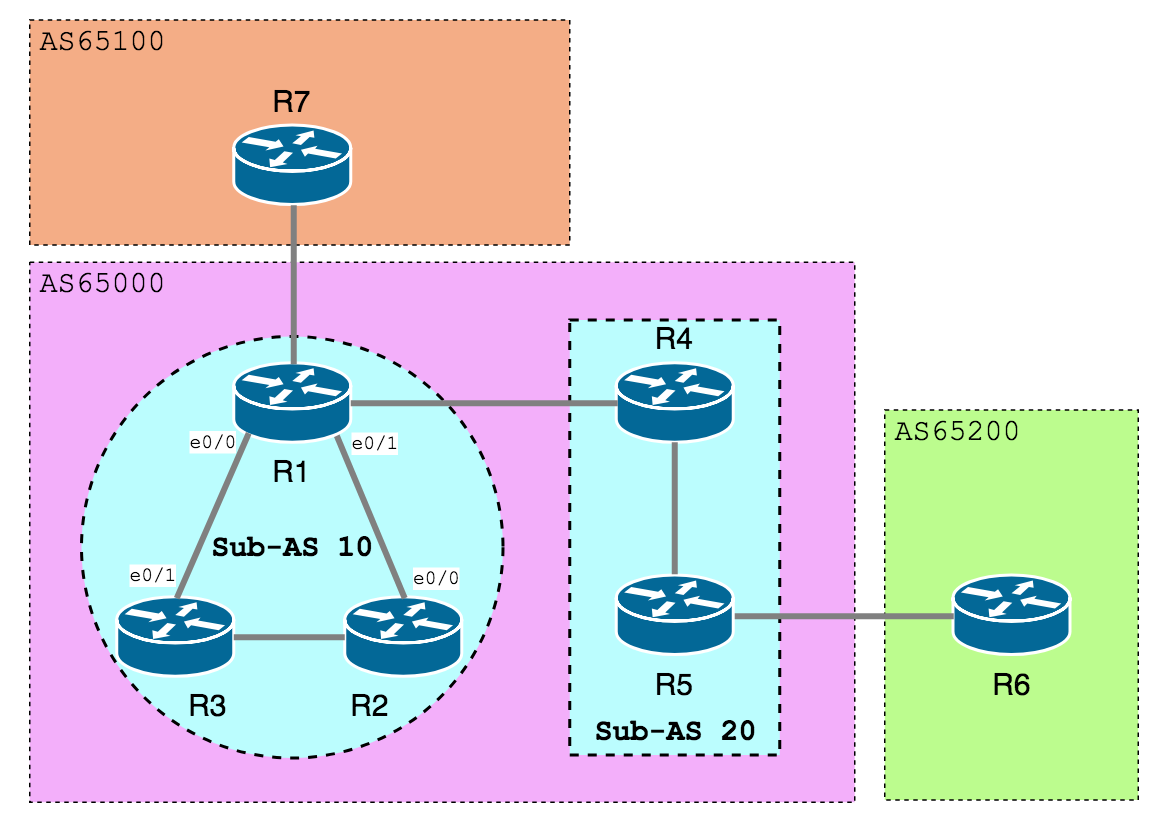
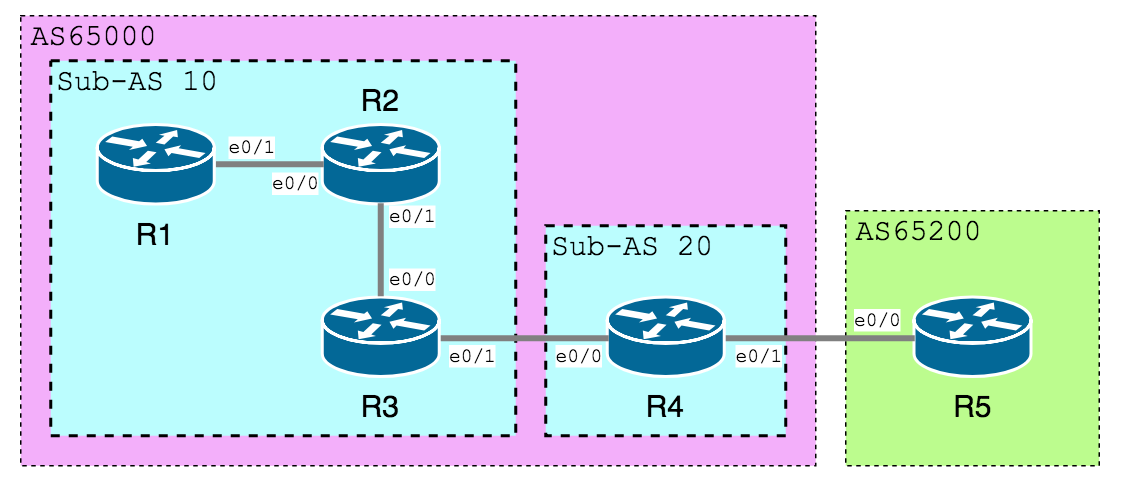
在 R4 查看 BGP Table,发现没有收到 2.2.2.0/24,因为 R3 看见 Prefix 的 Community 是 local-AS,这条 Prefix 只能存在于 Confederation 的 Local AS 之中,R4 位于另一个 AS,因此 R3 不把这条 Prefix 发出去。
R4
1
2
3
4
5
6
7
8
9
R4#show ip bgp
BGP table version is 3, local router ID is 192.168.45.4
Status codes: s suppressed, d damped, h history, * valid, > best, i - internal,
r RIB-failure, S Stale
Origin codes: i - IGP, e - EGP, ? - incomplete
Network Next Hop Metric LocPrf Weight Path
*> 3.3.3.0/24 192.168.34.3 0 100 0 (10) i
*> 4.4.4.0/24 192.168.34.3 0 100 0 (10) i
最后,在 R5 不会看到 3.3.3.0/24,因为这条 Prefix 的 Community 是 no-export,因此 R4 不会发给位于其他 AS 之内的 R5。至于 4.4.4.0/24 的 Community 是 internet 则没有此限制。
R5
1
2
3
4
5
6
7
8
R5#show ip bgp
BGP table version is 2, local router ID is 192.168.45.5
Status codes: s suppressed, d damped, h history, * valid, > best, i - internal,
r RIB-failure, S Stale
Origin codes: i - IGP, e - EGP, ? - incomplete
Network Next Hop Metric LocPrf Weight Path
*> 4.4.4.0/24 192.168.45.4 0 65000 i
R1#show ip bgp
BGP table version is 8, local router ID is 192.168.12.1
Status codes: s suppressed, d damped, h history, * valid, > best, i - internal,
r RIB-failure, S Stale, m multipath, b backup-path, f RT-Filter,
x best-external, a additional-path, c RIB-compressed,
Origin codes: i - IGP, e - EGP, ? - incomplete
RPKI validation codes: V valid, I invalid, N Not found
Network Next Hop Metric LocPrf Weight Path
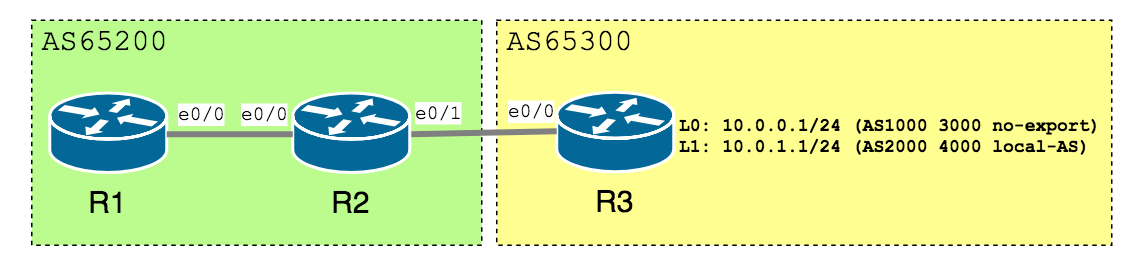
*>i 10.0.0.0/24 192.168.12.2 0 100 0 65023 1000 2000 i
*>i 10.0.0.0/23 192.168.12.2 0 100 0 i
*>i 10.0.1.0/24 192.168.12.2 0 100 0 65023 2000 4000 i
R1#show ip bgp
BGP table version is 8, local router ID is 192.168.12.1
Status codes: s suppressed, d damped, h history, * valid, > best, i - internal,
r RIB-failure, S Stale, m multipath, b backup-path, f RT-Filter,
x best-external, a additional-path, c RIB-compressed,
Origin codes: i - IGP, e - EGP, ? - incomplete
RPKI validation codes: V valid, I invalid, N Not found
Network Next Hop Metric LocPrf Weight Path
*>i 10.0.0.0/23 192.168.12.2 0 100 0 i
R1#show ip bgp
BGP table version is 8, local router ID is 192.168.12.1
Status codes: s suppressed, d damped, h history, * valid, > best, i - internal,
r RIB-failure, S Stale, m multipath, b backup-path, f RT-Filter,
x best-external, a additional-path, c RIB-compressed,
Origin codes: i - IGP, e - EGP, ? - incomplete
RPKI validation codes: V valid, I invalid, N Not found
Network Next Hop Metric LocPrf Weight Path
*>i 10.0.0.0/23 192.168.12.2 0 100 0 i
*>i 10.0.1.0/24 192.168.12.2 0 100 0
留意 Summary Route 失去了 AS Path 信息,AS Path 是防止 Route Loop 的机制,建议在 aggregate-address 增加 as-set 选项保留 AS Path 信息。
R1#show ip bgp
BGP table version is 15, local router ID is 192.168.12.1
Status codes: s suppressed, d damped, h history, * valid, > best, i - internal,
r RIB-failure, S Stale, m multipath, b backup-path, f RT-Filter,
x best-external, a additional-path, c RIB-compressed,
Origin codes: i - IGP, e - EGP, ? - incomplete
RPKI validation codes: V valid, I invalid, N Not found
Network Next Hop Metric LocPrf Weight Path
*>i 10.0.0.0/23 192.168.12.2 0 100 0 {65023,1000,3000,2000,4000} i
留意 as-set 除了保留 AS Path 信息,也帮 Summary Route 继承了所有 Community 属性。
R1
1
2
3
4
5
6
7
8
9
10
R1#show ip bgp 10.0.0.0/23
BGP routing table entry for 10.0.0.0/23, version 25
Paths: (1 available, best #1, table default, not advertised to EBGP peer)
  Not advertised to any peer
  Refresh Epoch 2
  {65023,1000,3000,2000,4000}, (aggregated by 65012 192.168.23.2)
    192.168.12.2 from 192.168.12.2 (192.168.23.2)
      Origin IGP, metric 0, localpref 100, valid, internal, best
      Community: no-export local-AS
      rx pathid: 0, tx pathid: 0x0
如果不想继承所有 Community 属性,可以使用 advertise-map 去帮 Summary Route 选择继承那一条 Route 的属性。
R1#show ip bgp
BGP table version is 6, local router ID is 1.1.1.1
Status codes: s suppressed, d damped, h history, * valid, > best, i - internal,
              r RIB-failure, S Stale
Origin codes: i - IGP, e - EGP, ? - incomplete

   Network          Next Hop            Metric LocPrf Weight Path
r> 2.2.2.0/24       192.168.13.3                           0 65001 i

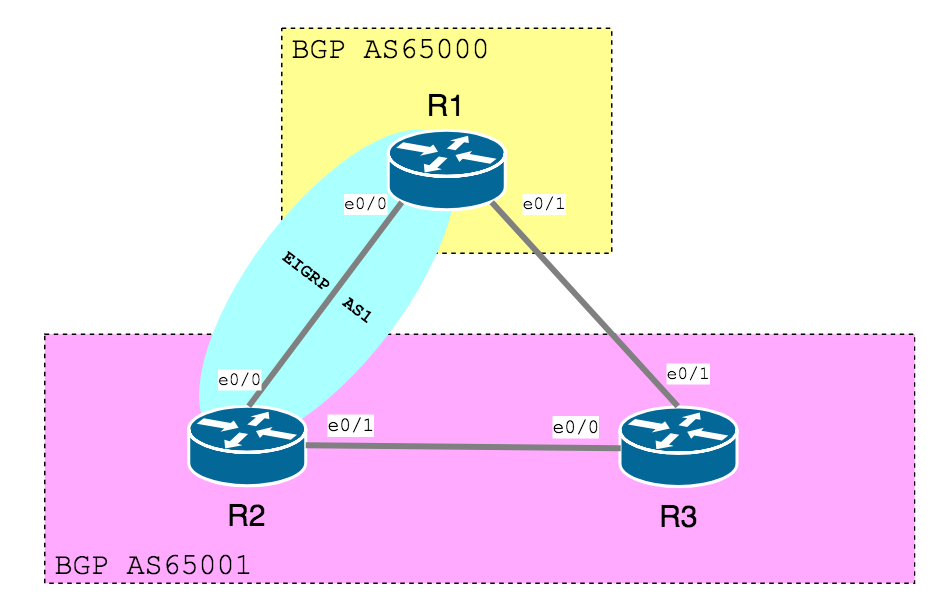
R1#show ip eigrp topology
IP-EIGRP Topology Table for AS(1)/ID(1.1.1.1)

Codes: P - Passive, A - Active, U - Update, Q - Query, R - Reply,
       r - reply Status, s - sia Status

P 2.2.2.0/24, 1 successors, FD is 409600
        via 192.168.12.2 (409600/128256), Ethernet0/0
P 192.168.12.0/24, 1 successors, FD is 281600
        via Connected, Ethernet0/0

R1#show ip route | begin Gateway
Gateway of last resort is not set

C    192.168.12.0/24 is directly connected, Ethernet0/0
     1.0.0.0/24 is subnetted, 1 subnets
C       1.1.1.0 is directly connected, Loopback0
C    192.168.13.0/24 is directly connected, Ethernet0/1
     2.0.0.0/24 is subnetted, 1 subnets
B       2.2.2.0 [20/0] via 192.168.13.3, 00:00:02
R1(config)#router bgp 65000
R1(config-router)#network 2.2.2.0 mask 255.255.255.0 backdoor
R1(config-router)#end
R1#show ip route | begin Gateway
Gateway of last resort is not set

C    192.168.12.0/24 is directly connected, Ethernet0/0
     1.0.0.0/24 is subnetted, 1 subnets
C       1.1.1.0 is directly connected, Loopback0
C    192.168.13.0/24 is directly connected, Ethernet0/1
     2.0.0.0/24 is subnetted, 1 subnets
D       2.2.2.0 [90/409600] via 192.168.12.2, 00:00:22, Ethernet0/0





al2359(3年前 (2023-02-06))