说明
无限制全自动dd安装Windows;
突破没有VNC,没有救援模式,内存比dd包小的限制;
使用Debian Live CD中的busybox做中间媒介,经过复杂的处理使本机的网络参数传进Windows操作系统中;
即使没有DHCP能够让Windows获取网络参数,也能让Windows操作系统在开机的第一时间能够连通网络;
本站所提供的脚本及安装包均来源于网络并通过测试;
特别注意:脚本不适用于OpenVZ构架的服务器,请勿尝试;
安装依赖
写在前面:
1、DD windows 请使用 Debian10系统,谢谢!
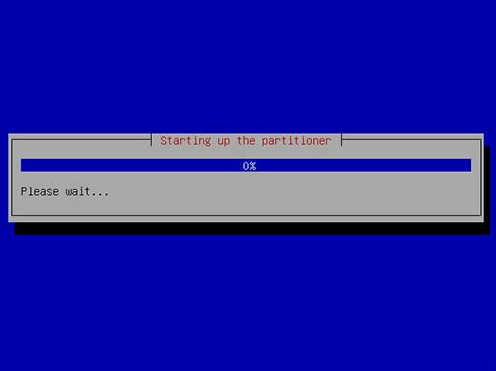
2、DD如果进VNC一般会看见卡进度条在 starting up the partitioner 这就不动了,可能卡很久,半小时、一小时甚至两三小时,首先说明这个卡进度一般都是正常的,因为这种包制作的时候分区这里本来进度条就是不动的,其实由于机器性能不同,卡住的时间也不尽相同,所以这个时候千万不要急,稍安勿躁,看会儿电影再来看看也不迟,不要急着去重启机器,尽管我自己也等的很烦躁,但是事实是它真的能卡出来并且安装成功。
如果一直卡在 starting up the partitioner 这个页面很久的话,我们可以查看后台监控的磁盘性能等参数,如果发现磁盘读写降下来的时候可以尝试重启机器,正常情况下都会DD成功。
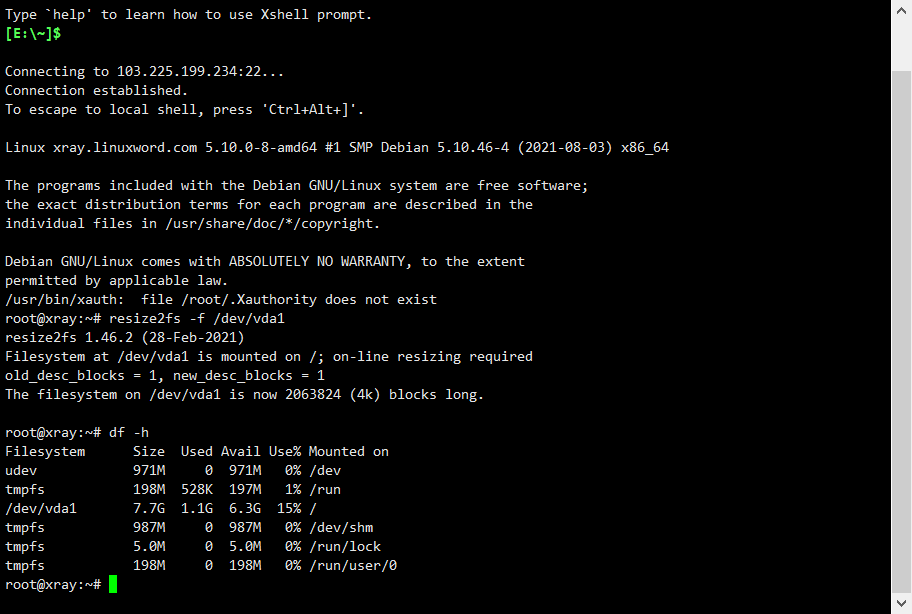
第一步:整合系统磁盘 (Debian11和Ubuntu20需要使用) ,设置后可以输入 df-h查看硬盘情况
代码:resize2fs -f /dev/vda1
第二步:安装必要组件:
apt -y update && apt -y install nano zip wget curl screen unzip vim && apt -y upgrade && screen -S setupscreen
第三步:启用BBR+FQ协议(后reboot重启)
wget --no-check-certificate https://github.com/teddysun/across/raw/master/bbr.sh && chmod +x bbr.sh && ./bbr.sh
或者
wget -N --no-check-certificate "https://raw.githubusercontent.com/chiakge/Linux-NetSpeed/master/tcp.sh" && chmod +x tcp.sh && ./tcp.sh

在SSH中运行以下命令:
bash <(curl -sL https://raw.githubusercontent.com/FoxBary/smallvps/main/vmshellvps.sh)
第一步通过SSH登录VPS服务器并执行命令,更新系统和依赖:
#Debian/Ubuntu系统:
apt -y update && apt install -y xz-utils openssl gawk file curl wget screen && screen -S windows
#RedHat/CentOS系统:
yum -y update && yum install -y xz openssl gawk file screen && screen -S windows
第二步:选择您需要的windows版本,我们推荐如下两个简洁版本
Windows7 版本服务器[默认账户:Administrator ;默认密码是:nat.ee]:
wget --no-check-certificate -qO InstallNET.sh 'https://d.02es.com/InstallNET.sh' && bash InstallNET.sh -dd 'https://d.02es.com/Windows/Win7_sp1_64_Administrator_nat.ee.gz'
Windows10版本服务器 [默认账户:Administrator ;默认密码是:Vicer]:
wget --no-check-certificate -qO InstallNET.sh 'https://d.02es.com/InstallNET.sh' && bash InstallNET.sh -dd 'https://d.02es.com/Windows/Win10_2019LTSC_64_Administrator_Vicer.gz'
示例脚本,补全DD包直连地址后运行即可;
wget --no-check-certificate -qO InstallNET.sh 'https://moeclub.org/attachment/LinuxShell/InstallNET.sh' && bash InstallNET.sh -dd '[Windows DD包直链地址]'
精简版DD包
选择好版本,输入以下一键脚本即可
# DD Windows Server 2003 32位 精简版 [账户Administrator密码cxthhhhh.com]
wget --no-check-certificate -qO InstallNET.sh 'https://moeclub.org/attachment/LinuxShell/InstallNET.sh' && bash InstallNET.sh -dd 'https://oss.sunpma.com/Windows/Win_Server2003_86_Administrator_cxthhhhh.com.gz'
# DD Windows Server 2008 R2 64位 精简版 [账户Administrator密码nat.ee]
wget --no-check-certificate -qO InstallNET.sh 'https://moeclub.org/attachment/LinuxShell/InstallNET.sh' && bash InstallNET.sh -dd 'https://oss.sunpma.com/Windows/Win_Server2008R2_sp1_64_Administrator_nat.ee.gz'
# DD Windows Server 2012 R2 64位 精简版 [账户Administrator密码WinSrv2012r2x64-Chinese]
wget --no-check-certificate -qO InstallNET.sh 'https://moeclub.org/attachment/LinuxShell/InstallNET.sh' && bash InstallNET.sh -dd 'https://oss.sunpma.com/Windows/Win_Server2012R2_64_Administrator_WinSrv2012r2x64-Chinese.gz'
# DD Windows Server 2019 Datacenter 64位 精简版 [账户Administrator密码WinSrv2019dc-Chinese]
wget --no-check-certificate -qO InstallNET.sh 'https://moeclub.org/attachment/LinuxShell/InstallNET.sh' && bash InstallNET.sh -dd 'https://oss.sunpma.com/Windows/Win_Server2019_64_Administrator_WinSrv2019dc-Chinese.gz'
# DD Windows7 32位 精简版 [账户Administrator密码Windows7x86-Chinese]
wget --no-check-certificate -qO InstallNET.sh 'https://moeclub.org/attachment/LinuxShell/InstallNET.sh' && bash InstallNET.sh -dd 'https://oss.sunpma.com/Windows/Win7_86_Administrator_Windows7x86-Chinese.gz'
# DD Windows7 sp1 64位 企业精简版 [账户Administrator密码nat.ee]
wget --no-check-certificate -qO InstallNET.sh 'https://moeclub.org/attachment/LinuxShell/InstallNET.sh' && bash InstallNET.sh -dd 'https://oss.sunpma.com/Windows/Win7_sp1_64_Administrator_nat.ee.gz'
#DD Windows8.1 64位 专业精简版 [账户Administrator密码nat.ee]
wget --no-check-certificate -qO InstallNET.sh 'https://moeclub.org/attachment/LinuxShell/InstallNET.sh' && bash InstallNET.sh -dd 'https://oss.sunpma.com/Windows/Win8.1_64_Administrator_nat.ee.gz'
#DD Windows8.1 64位 适量精简版 [账户Administrator密码Vicer]
wget --no-check-certificate -qO InstallNET.sh 'https://moeclub.org/attachment/LinuxShell/InstallNET.sh' && bash InstallNET.sh -dd 'https://oss.sunpma.com/Windows/Win8.1_64_Administrator_Vicer.gz'
# DD Windows10 2016LTSB 64位 企业深度精简版 [账户Administrator密码nat.ee]
wget --no-check-certificate -qO InstallNET.sh 'https://moeclub.org/attachment/LinuxShell/InstallNET.sh' && bash InstallNET.sh -dd 'https://oss.sunpma.com/Windows/Win10_2016LTSB_64_Administrator_nat.ee.gz'
# DD Windows10 2019LTSC 64位 企业适量精简版 [账户Administrator密码Vicer]
wget --no-check-certificate -qO InstallNET.sh 'https://moeclub.org/attachment/LinuxShell/InstallNET.sh' && bash InstallNET.sh -dd 'https://oss.sunpma.com/Windows/Win10_2019LTSC_64_Administrator_Vicer.gz'
完整版一键DD:
# DD Windows Server 2012 R2 Datacenter 64位 完整版 [账户administrator密码Password147]
wget --no-check-certificate -qO InstallNET.sh 'https://moeclub.org/attachment/LinuxShell/InstallNET.sh' && bash InstallNET.sh -dd 'https://oss.sunpma.com/Windows/Whole/cn_windows2012r2_administrator_Password147.gz'
# DD Windows Server 2016 Datacenter 64位 完整版 [账户administrator密码Password147]
wget --no-check-certificate -qO InstallNET.sh 'https://moeclub.org/attachment/LinuxShell/InstallNET.sh' && bash InstallNET.sh -dd 'https://oss.sunpma.com/Windows/Whole/cn_windows2016_administrator_Password147.gz'
# DD Windows Server 2019 Datacenter 64位 完整版 [账户administrator密码Password147]
wget --no-check-certificate -qO InstallNET.sh 'https://moeclub.org/attachment/LinuxShell/InstallNET.sh' && bash InstallNET.sh -dd 'https://oss.sunpma.com/Windows/Whole/cn_windows2019_administrator_Password147.gz'
# DD Windows7 sp1 64位 [账户Administrator密码nat.ee]
wget --no-check-certificate -qO InstallNET.sh 'https://moeclub.org/attachment/LinuxShell/InstallNET.sh' && bash InstallNET.sh -dd 'https://oss.sunpma.com/Windows/Whole/Win7_sp1_64_Administrator_nat.ee.gz'
# DD Windows8.1 64位 [账户Administrator密码nat.ee]
wget --no-check-certificate -qO InstallNET.sh 'https://moeclub.org/attachment/LinuxShell/InstallNET.sh' && bash InstallNET.sh -dd 'https://oss.sunpma.com/Windows/Whole/Win8.1_64_Administrator_nat.ee.gz'
# DD Windows10 LTSC 64位 [账户Administrator密码nat.ee]
wget --no-check-certificate -qO InstallNET.sh 'https://moeclub.org/attachment/LinuxShell/InstallNET.sh' && bash InstallNET.sh -dd 'https://oss.sunpma.com/Windows/Whole/Win10_LTSC_64_Administrator_nat.ee.gz'
「梦想一旦被付诸行动,就会变得神圣,如果觉得我的文章对您有用,请帮助本站成长」







al2359(4年前 (2023-02-06))