VmShell-Credit Card: WHMCS Stripe Link & 3DS Gateway (Open Source)
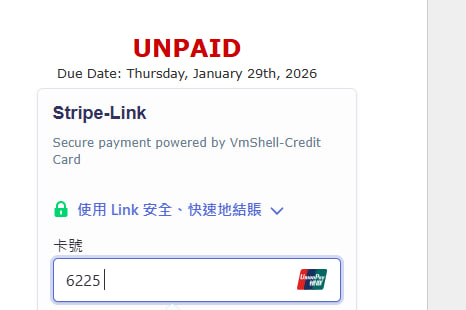
VmShell-Credit Card 是一款由 VmShell INC. 開源發佈的 WHMCS 支付網關模組。它旨在為 WHMCS 用戶提供一個現代化、安全且高度整合的 Stripe 支付解決方案。本插件利用最新的 Stripe Payment Intents API,完美支援 3D Secure (3DS) 驗證和 Stripe Link 快速支付功能,顯著提升了支付的安全性和用戶體驗。
English Version: Product Overview
VmShell-Credit Card is an open-source WHMCS payment gateway module released by VmShell INC. It is designed to provide WHMCS users with a modern, secure, and highly integrated Stripe payment solution. Leveraging the latest Stripe Payment Intents API, this plugin fully supports 3D Secure (3DS) authentication and Stripe Link fast checkout, significantly enhancing both payment security and user experience.
核心功能與技術優勢 (Key Features and Technical Advantages)
| 功能 (Feature) |
中文描述 (Chinese Description) |
英文描述 (English Description) |
| 3D Secure 2.0 支援 |
自動處理 3D Secure 2 驗證流程,符合歐洲 SCA(Strong Customer Authentication)法規,有效降低欺詐風險。 |
Automatically handles 3D Secure 2 authentication, complying with European SCA (Strong Customer Authentication) regulations and effectively mitigating fraud risk. |
| Stripe Link 快速支付 |
允許用戶使用 Stripe Link 儲存的支付資訊,一鍵快速完成結帳,極大優化移動端和重複購買體驗。 |
Enables users to complete checkout quickly with one click using payment information saved via Stripe Link, greatly optimizing the experience for mobile and repeat purchases. |
| 嵌入式支付介面 |
將 Stripe Payment Element 直接嵌入到 WHMCS 賬單頁面右上角,無需跳轉,提供無縫的站內支付體驗。 |
Embeds the Stripe Payment Element directly into the top-right section of the WHMCS invoice page, providing a seamless, on-site payment experience without redirection. |
| 下單自動跳轉支付 |
用戶完成下單後,系統會自動跳轉至賬單頁面並立即顯示支付界面,減少操作步驟,提高支付完成率。 |
After an order is placed, the system automatically redirects to the invoice page and immediately displays the payment interface, reducing steps and increasing payment completion rates. |
| 後台幣種靈活配置 |
支援在 WHMCS 後台配置 Stripe 結算幣種(默認 USD),滿足不同地區的業務需求。 |
Supports flexible configuration of the Stripe settlement currency (default USD) in the WHMCS admin panel, catering to various regional business needs. |
| Webhook 異步通知 |
內建 Webhook 處理機制,確保即使在網絡不穩定的情況下,支付狀態也能準確、實時地更新到 WHMCS 賬單。 |
Includes a built-in Webhook handling mechanism to ensure accurate and real-time payment status updates to WHMCS invoices, even with network instability. |
- 尋求現代化、高安全性支付解決方案的 WHMCS 服務提供商。
- 需要符合 SCA 法規,並希望降低信用卡欺詐率的商家。
- 希望通過 Link 快速支付提升客戶結帳體驗的企業。
技術要求 (Technical Requirements)
| 項目 (Item) |
要求 (Requirement) |
| WHMCS 版本 |
7.x 或更高版本 (建議使用最新版本) |
| PHP 版本 |
7.4 或更高版本 |
| Stripe 賬戶 |
已啟用 Stripe 賬戶,並獲取 Secret Key 和 Publishable Key |
| cURL 擴展 |
伺服器需支援 PHP cURL 擴展 |
開源承諾 (Open Source Commitment)
本插件以開源形式發佈,VmShell INC. 承諾:
"我們相信透明和社區的力量。本插件的全部源碼均已公開,允許任何用戶審查、修改和貢獻。我們鼓勵社區成員共同維護和改進此模組,為 WHMCS 生態系統提供一個可靠、免費且持續更新的 Stripe 支付解決方案。"
Author: VmShell INC. Version: 1.0 (Final Optimized Release) License: MIT License (或您指定的開源許可證)
Github地址: https://github.com/FoxBary/VmShell-Strip.link-Credit-Card-WHMCS (喜欢我们的可以加一个星星)
VmShell-CreditCard 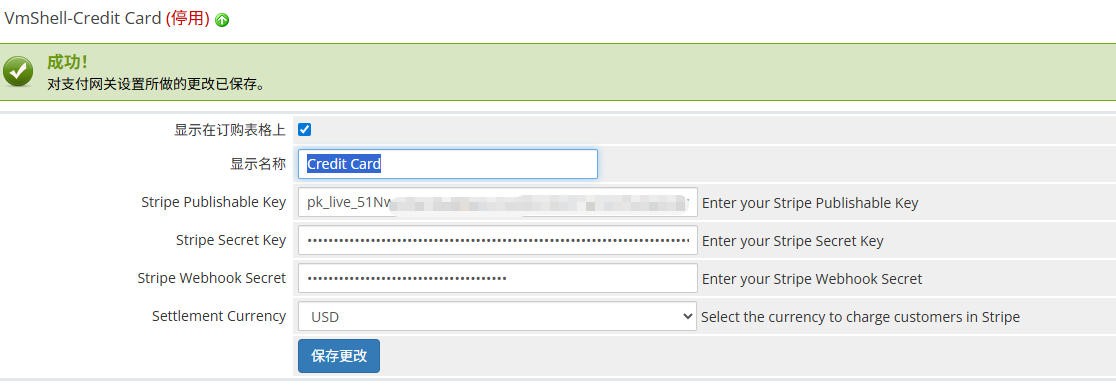
WHMCS Stripe Webhook 配置圖文指南
本指南將詳細說明如何配置 Stripe Webhook,以確保您的 WHMCS 系統能夠實時接收支付通知,自動更新發票狀態。
您的 WHMCS 系統的 Webhook URL 格式是固定的,請將 [您的 WHMCS 系統 URL] 替換為您的實際域名和路徑。
Webhook URL 格式: [您的 WHMCS 系統 URL]/modules/gateways/callback/stripe_link_webhook.php
例如:如果您的 WHMCS 系統位於 https://billing.vmshell.com/,則 Webhook URL 為 https://billing.vmshell.com/modules/gateways/callback/stripe_link_webhook.php。
步驟二:在 Stripe Dashboard 中配置 Webhook
-
登入 Stripe Dashboard:
- 登入您的 Stripe 賬戶。
- 導航至 開發者 (Developers) -> Webhook 頁面。
- (模擬截圖:Stripe Dashboard 導航欄,突出顯示「Developers」和「Webhook」)
-
新增端點:
- 點擊 新增端點 (Add endpoint) 按鈕。
- (模擬截圖:Webhook 頁面,突出顯示「Add endpoint」按鈕)
-
填寫端點資訊:
- 端點 URL (Endpoint URL):貼上您在步驟一中獲取的 Webhook URL。
- 版本 (Version):選擇 最新 API 版本 (Latest API version)。
- 事件 (Events):點擊 選擇事件 (Select events),您必須訂閱以下事件:
payment_intent.succeeded (支付成功)payment_intent.payment_failed (支付失敗,可選)charge.refunded (退款,可選)
- (模擬截圖:新增端點彈窗,突出顯示 URL 欄位和事件選擇)
-
儲存並獲取密鑰:
- 點擊 新增端點 (Add endpoint) 完成配置。
- 在新創建的 Webhook 端點詳情頁面中,找到 簽名密鑰 (Signing secret) 欄位。
- 點擊 點擊顯示 (Click to reveal),複製完整的密鑰(以
whsec_ 開頭)。
- 請務必複製此密鑰,這是下一步在 WHMCS 中配置所需的關鍵資訊。
- (模擬截圖:端點詳情頁面,突出顯示「Signing secret」和「Click to reveal」按鈕)
步驟三:在 WHMCS 後台配置 Webhook 密鑰
-
登入 WHMCS 管理後台:
- 導航至 系統設定 (Setup) -> 支付 (Payments) -> 支付網關 (Payment Gateways)。
- (模擬截圖:WHMCS 後台導航欄,突出顯示「Setup」和「Payment Gateways」)
-
編輯 VmShell-Credit Card 網關:
- 在 所有支付網關 (All Payment Gateways) 列表中,找到 VmShell-Credit Card 並點擊 管理 (Manage)。
- (模擬截圖:支付網關列表,突出顯示 VmShell-Credit Card 的「Manage」按鈕)
-
填寫 Webhook Secret:
- 找到 Stripe Webhook Secret 欄位。
- 貼上您在步驟二中從 Stripe 複製的
whsec_ 開頭的簽名密鑰。
- (模擬截圖:VmShell-Credit Card 配置頁面,突出顯示「Stripe Webhook Secret」欄位)
-
儲存更改:
- 點擊底部的 儲存更改 (Save Changes) 按鈕。
配置完成! 現在,您的 WHMCS 系統已準備好接收來自 Stripe 的實時支付通知,確保發票狀態的自動更新。
插件下载地址: https://linuxword.com/wp-content/uploads/2026/01/VmShell-CreditCard.zip
「梦想一旦被付诸行动,就会变得神圣,如果觉得我的文章对您有用,请帮助本站成长」




al2359(3年前 (2023-02-06))